
bombora

Press "Enter" to Search, or "Esc" to Cancel

!!!

Adobe Real-Time CDP Integration: Bombora as the destination

Activate Adobe account audiences with Bombora

If you’re using Adobe Real-Time CDP (B2B Edition) to build account audience segments, you can now send those segments directly to Bombora for activation across paid media.

Bombora transforms Adobe account segments into addressable digital audiences that can be activated across major programmatic platforms such as The Trade Desk and DV360, CTV environments, social platforms like Reddit, and other paid media channels including native, search, and audio.

This page explains how the Adobe → Bombora destination connector works and what you need to do to successfully activate your audiences across paid media through Bombora.

What the Adobe → Bombora destination connector enables

Adobe Real-Time CDP centralizes your account intelligence. You unify CRM data, lifecycle stage, product usage, and third-party signals into a single account view and build precise account segments.

The Bombora destination connector allows you to transform Adobe account segments into addressable digital audiences that can be activated across paid media. 

With this connector, you can:

  • Send any Adobe-define account segment to Bombora, where it is transformed into an addressable digital audience
  • Activate those audiences across programmatic platforms, social environments like Reddit, CTV, native, search, and other paid channels
  • Reach members of the buying group beyond the contacts in your first-party systems, engaging professionals in the “dark funnel” (buyers who have not yet identified themselves through form fills or direct engagement) 

Account strategy defined in Adobe becomes scalable, addressable, and executable across the broader advertising ecosystem—extending account-based activation beyond walled gardens into the open web.
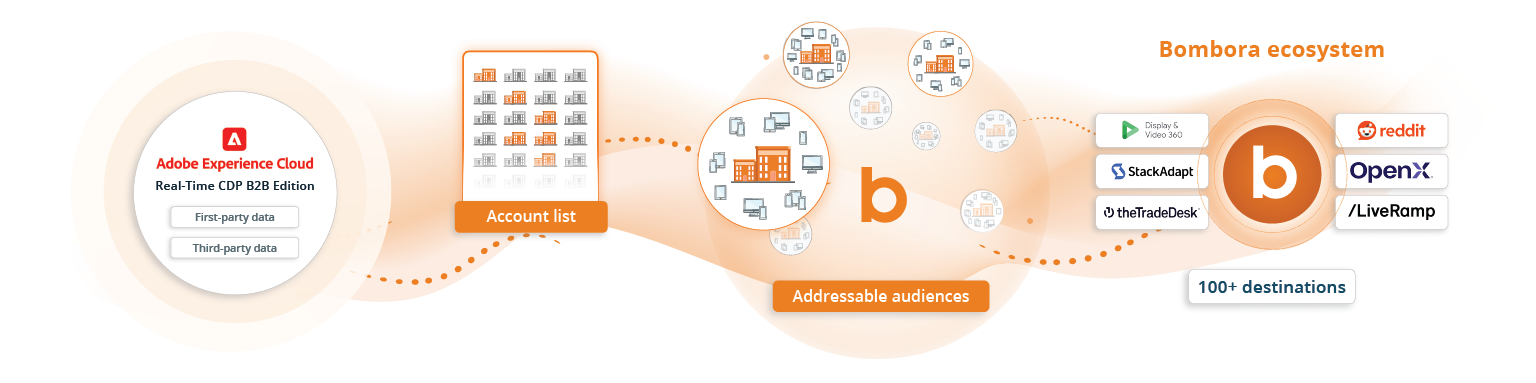
Adobe integration data flow

Who can use this connector

You do not need to be a current licensed Bombora customer to activate account lists from Adobe. There are three scenarios:

1. Existing Bombora customer with an API key
Enter your existing API key directly in Adobe and complete the configuration.

2. Existing Bombora customer without an API key
Request API access from Bombora by reaching out to your Customer Success Manager who will help generate an API key.

3. Not currently a Bombora customer
Request activation access by submitting the Audience Activation request form. Bombora will create an entity and generate API credentials for you. No additional contract is required.

How the Adobe → Bombora destination connector works

Step 1: Configure Bombora as a destination in Adobe

In Adobe Real-Time CDP:

  • Navigate to Destinations
  • Select Bombora under Advertising
  • Begin configuration

You will be prompted to enter your Bombora API key.

Step 2: Enter your Bombora API key

Depending on your situation:

  • If you already have an API key, enter it directly.
  • If you’re an existing customer without one, request access through your Bombora representative. 
  • If you’re not a Bombora Company Surge® customer, submit the Audience Activation request form to generate credentials.

Once your API key is entered and validated, you can complete the destination setup.

Step 3: Map required fields

To successfully send audiences from Adobe to Bombora, you must configure field mapping correctly. 

Required: domain field representing the account’s website domain.

Within Adobe, prior to sending the data to Bombora, ensure domain formatting meets Bombora validation standards:

  • Do not include http:// or https://
  • Do not include trailing slashes
  • Do not include URL paths (e.g., /about)

Example:
Correct: acmecorp.com
Incorrect: https://acmecorp.com

The exact field mapped to Bombora will depend on how domain values are stored in your Adobe environment. There are different fields within a schema that can store B2B account domains, so the appropriate field to map can vary by implementation. 

If domain values require formatting or cleansing to meet Bombora’s validation standards, this should be completed within Adobe prior to sending the audience. 

For more information, please refer to Adobe’s documentation here

Step 4. Activate your audience in Adobe

Once the connector is configured and fields are mapped:

  • Create an account audience in Adobe or select an existing audience
  • Click into the account audience
  • Activate to the Bombora Account Audiences destination

Adobe will transmit the account list to Bombora. 

Step 5: Submit fulfillment request to Bombora

After your audience is sent from Adobe, you must submit a fulfillment request to Bombora’s Audience Desk—Bombora’s operations team responsible for preparing and delivering audiences to activation platforms.

The fulfillment request should include:

  • Audience name
  • Activation platform(s)
  • Seat ID (if applicable)
  • Any additional targeting criteria

Once received, Bombora’s Audience Desk will:

  • Confirm receipt of the account list
  • Share audience estimate
  • Send the audience to the appropriate activation platform
  • Confirm delivery

Your Adobe account list is now available as an addressable paid media audience. 

Before you activate

To ensure successful delivery, your Adobe audience must meet the following criteria:

  • The dataset must be a Profile dataset in Adobe
  • The audience must contain fewer than 100,000 domains
  • Domains must meet Bombora’s validation requirements (proper formatting as described above)

Audiences that do not meet these criteria may fail during delivery.

What happens after activation

Once fulfilled by the Audience Desk:

  • Your account list is translated into a digital audience mapped to addressable identifiers
  • The audience is delivered to the selected activation platform(s)
  • You can begin executing paid campaigns against the account audience defined in Adobe

For a full overview of Bombora’s audience activation capabilities and supported destinations, visit the Bombora Digital Audiences page.

Frequently asked questions

Do I need a Company Surge® license to activate audiences from Adobe?+
No. You do not need to license Company Surge® Intent data to use the Adobe → Bombora destination connector. This connector can be used for audience activation-only use cases.
Can I activate audiences built using my first-party data?+
Yes. Any account audience built in Adobe Real-Time CDP can be sent to Bombora for activation. Adobe sends Bombora a list of account domains, which Bombora translates into addressable digital audiences using its identity graph.
Is activation automatic once I send the audience from Adobe?+
No. After activating the audience in Adobe, you must submit a fulfillment request to Bombora’s Audience Desk. The Audience Desk completes the final delivery to activation platforms.
How often are updates reflected?+
Adobe processes audience updates daily. If accounts are added to or removed from the audience in Adobe, those changes will be reflected in the account list delivered to Bombora during the next update cycle. However, you will need to submit a new fulfillment request to Bombora’s Audience Desk in order to see the updates reflected in the activated audience.
What identifier is required?+
A properly formatted domain field is required. Bombora uses domain-based account lists to transform Adobe accounts into addressable digital audiences.
Is there a minimum or maximum audience size?+
Audiences must contain fewer than 100,000 domains due to current delivery constraints. There is no strict minimum, but very small audiences may limit scalable activation.
Can I suppress certain accounts?+
Yes. Account-level suppression should be handled in Adobe when building your account audience. Additional exclusions based on attributes can be applied within Bombora during audience activation.
What channels can I activate on?+
Bombora supports activation across programmatic, paid social, native, CTV, search, audio, and additional digital environments, including platforms such as The Trade Desk, DV360, LinkedIn, Reddit, Meta, Taboola, Spotify, and more. To better understand our supported activation paths, refer to our Digital Audiences page.
Who should I contact if I need help with activation?+
If you are an existing Bombora customer, please contact your Customer Success Manager. For activation support or fulfillment questions, you can also contact audiencedesk@bombora.com.
